Data corruption is one of the most common causes of permanent data loss. Yet, preventing data breaches typically takes precedence over stopping corruption, even though both events lead to severe consequences. A corrupted file may not lead to as many legal problems as a breach, but permanently losing data undoubtedly impacts business continuity and your bottom line.
This article is an intro to data corruption and the dangers of not having reliable backups. Read on to learn about the most common causes of data corruption and see what your team can do to lower the likelihood of permanently losing valuable files.
What is Data Corruption?
Data corruption refers to any unwanted change that happens to a file during storage, transmission, or processing. A corrupted file can become unusable, inaccurate, unreadable, or in some way inaccessible to a user or a related app.
Most data corruptions occur when a file somehow flips or mixes its binary code (bits of 0s and 1s). Bits are mixed up for many reasons, including hardware problems, software-based issues, and human mistakes.
Common symptoms of data corruption:
- A computer slows down or keeps freezing.
- Sudden program crashes.
- File names keep changing into nonsense characters.
- Inability to open a file or folder.
- Changes in file attributes.
- Relocated or lost data.
- Busy disk activity regardless of what's going on within the system.
Modern disks are not much safer than old ones in terms of data corruption—the probability of errors was just lower with older hardware because it stored tiny amounts of data compared to current devices.
Recent studies revealed just how prone our systems are to data corruption:
- Greenplum tested their large-scale data warehouses and found that they face a corruption-related problem every 15 minutes.
- CERN ran a six-month-long test on 97 petabytes of data to reveal that about 128 megabytes of data suffered long-term corruption.
- NetApp tested 1.5 million HDDs over 41 months to discover more than 400,000 data corruptions (over 30,000 instances went unnoticed by the RAID controller).
Read about data integrity and see why ensuring high reliability of files is as vital as preventing data corruption.
Detected vs. Undetected Data Corruption
Every instance of data corruption falls either under the detected or undetected category:
- Detected corruption is a data-related problem the team or the system has already identified. Complete identification requires discovering both the scope and the source of corruption.
- Undetected data corruption refers to file changes that occur without the knowledge of either the team or the operating system. Another common name for this type of issue is silent data corruption.
Both types of data corruption are harmful, but the silent kind is more damaging as it catches you off guard in a situation where you need data urgently. Also, if the cause of corruption is an underlying hardware or software issue, failing to identify the problem on time puts other data at risk. For example, a silent failure affecting file system metadata can continue to damage random data as you continue to use the system in its current state.
Both types of data corruption are either permanent or temporary. The difference between the two is that the latter enables you to restore a file to its original state (if you have proper backups, of course).
Be aware that there is no way to stop silent corruption entirely. Failures are a natural part of any system, so your team must dedicate resources to both preventing and monitoring for signs of data corruption.
Monitoring files and data is an essential part of running an in-house server. Learn what else your team needs to be regularly doing in our server management article.
Data Corruption Causes
Here are the most common causes of data corruption:
- Improper shutdowns due to a power outage or a hard restart (pressing and holding the power button).
- Hardware failures (e.g., a hard drive failure due to overheating, bad sectors (either hard or soft), physical issues with the disk's "platter," bad RAM, an old HDD, motherboard problems, etc.).
- Faulty networking infrastructure (issues with network cards (NICs), cables, routers, hubs, a switch, etc.).
- Ejecting an external hard drive or storage device before disconnecting them or turning them off.
- Failing or degraded portable storage media.
- Issues caused by insufficient disk space.
- Bad programming (e.g., a code bug that prevents a program from properly saving progress).
- Operating system errors (such as a sudden crash or freeze).
- Malicious code that a user accidentally installs on a device, such as a virus, malware, or ransomware.
- Software-based errors that occur during writing, editing, or transferring data to another drive.
- A failed or incompatible software update.
- A silo within error management.
- Environmental issues (extreme temperatures, heavy clouds, interference from household devices, damage from a natural disaster, external vibrations or loud sounds that wear down hardware, etc.).
Learn about data leakage, another data-related issue your security team should be actively preventing.
How to Detect Data Corruption?
Data corruption happens at any system level, from the host to the storage medium.
Common signs of data corruption are:
- Sudden system crashes.
- Slowed down performance and freezes.
- Altered file or folder names.
- Missing or relocated files and folders.
- Getting an "invalid file format" or "[file name] is not recognized" error when trying to open a file.
- Regular blue screen of death (BSOD) errors.
- An unexpected change in file permissions or attributes.
- Physical symptoms (e.g., clicking sounds or excessive vibration).
All major OSes notify the user in case of data corruption. However, you typically get an alert after the corruption starts to impact file cluster linking info, which means that:
- The message arrives long after the error affects the system, meaning that your backups likely saved corrupted data.
- Most OS-based repairs usually correct linkage problems but do not recover data within the file itself.
Instead of waiting for the system to notify you about an error, your IT team should have a more proactive approach to detecting data corruption. Besides checking up backups regularly, here's what else your team can be doing:
- Using checksums is a great way to detect an error when data corruption behaves as a Poisson process. Also use error-correcting codes (ECC) to fix the issue.
- If you are running Linux, use software RAID and ZFS to make the default configuration perform data scrubbing each month (the same approach works on Debian and Ubuntu systems).
- In Windows, run a script that reads each file once or twice a month and logs all unexpected changes.
Unsure what OS is the best option for your server? Our comparison of Linux and Windows servers offers an in-depth look at the two most popular choices.
How to Prevent Data Corruption: Best Practices
While some amount of data corruption is unavoidable, there are ways to limit the number of data-damaging errors. To prevent data corruption issues, apply the following best practices.
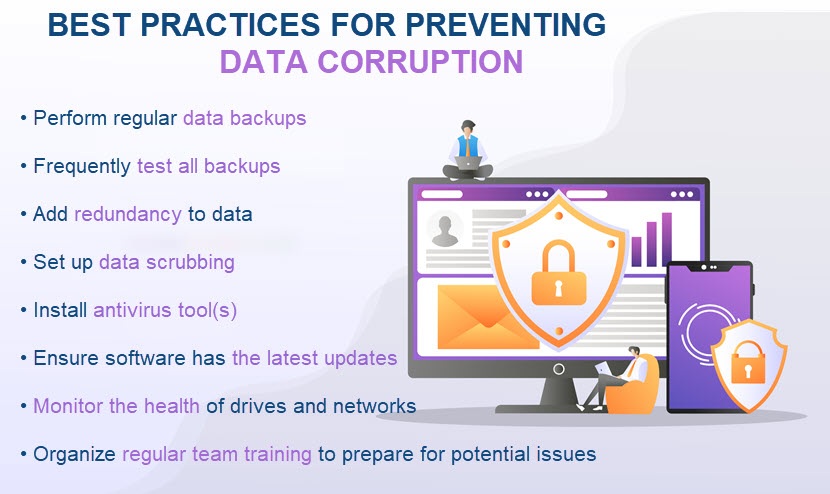
Have Backups for All Valuable Data (and Test Them Often)
Having regular, reliable data backups is the most effective way of preventing the impact of corruption. If something happens to the original file, just restore data to its previous state.
You do not have to back up all data but only sensitive information that would damage your business if you lose it. The frequency of backups depends on the value of data. Your mission-critical and compliance-tied databases should have daily backups, and weekly backups are enough for less vital data.
Are you backing up all your business data? Read our article to learn whether you should backup office 365 data and how!
Multiple backup systems are also a good business move. For example, use an on-prem external drive, a cloud backup, and off-site storage for the same data set. It is doubtful all three strategies will fail you at the same time.
Another must-have practice is to test backups regularly. If you are backing up corrupted data or the system is somehow failing, the backup will do you no good if something happens to the original file.
PhoenixNAP offers the most reliable backup and restore solutions on the market. Eliminate the threat of data corruption with cloud-based backups, customizable recovery features, and cutting-edge replication tech.
Set Up Data Scrubbing
Data scrubbing (or data cleansing) is the process of detecting and correcting incorrect, incomplete, and duplicate data within a database. This error correction technique runs as a low-priority background process that periodically inspects the main memory or storage for errors. If data scrubbing detects an issue, it corrects or removes the problem using redundant data in the form of:
- Different checksums.
- Copies of data.
Data scrubbing resolves the following issues:
- Various structural errors in data sets (misspellings, wrong numerical entries, syntax errors, missing values, null fields, etc.).
- Inconsistently formatted data.
- Duplicate data.
- Irrelevant info (e.g., an outlier or out-of-date entry).
While data scrubbing is not a prevention measure for data corruption, the process reduces the likelihood of errors accumulating and going out of control. Regular cleansing also boosts overall data integrity.
Keep an Eye on Hard Drives and Network Health
Checking hard drives' health is essential to preventing data corruption. Use one of the free S.M.A.R.T. (Self-Monitoring, Analysis, and Reporting Technology) diagnostics tools, such as:
- HDtune.
- HDDScan.
- CrystalDisk Info.
Keeping an eye on S.M.A.R.T. data enables you to detect various indicators of drive reliability. Most tools also have a helpful feature for predicting how much time a disk has before it starts degrading.
Also, regularly monitor the health of network equipment. If you are running an in-house server room, you should deploy a UPS (Uninterruptible Power Supply) to buy your team some time to save their work and turn devices off in case of an outage.
Use Antivirus Software (and Keep It Up to Date)
Antivirus tools are a strong defense against cyberattacks that try to corrupt data. A tool prevents payloads from executing when one of your staff members comes in contact with a malicious file or link, software add-on, or email attachment.
Set up a reliable firewall to protect all traffic. Another type of network security to consider is an intrusion detection system (IDS) set up in a way to notify your team if someone or something starts altering data.
High levels of cybersecurity are also vital in protecting against ransomware, one of the most damaging and widespread threats to your data.
Concerned about ransomware? Here are a few resources that can help you better understand this threat:
- Ransomware Examples
- How to Prevent Ransomware: 18 Best Practices
- How to Use Immutable Backups to Fight Ransomware
- Terrifying Ransomware Statistics & Facts
- All You Need to Know about Linux Ransomware
You do not have to tackle the dangers of ransomware on your own. PhoenixNAP's ransomware protection helps eliminate the risk of data loss through a range of cloud-based solutions that keep your business safe.
Ensure the Team Understands How to Prevent Data Corruption
Preparing staff members for potential disaster scenarios is vital. Without proper training, all other measures are meaningless, so ensure your team knows:
- How to set up and use the designated antivirus tool.
- Who to contact if they discover a potentially corrupted file.
- How to properly power devices on and off.
- All common signs of data and system corruption.
- Not to ignore system messages or updates.
- To troubleshoot problems as soon as they occur.
- How to properly use external drives and USBs.
- How to save a file without risking an error.
You should also organize regular security awareness training to ensure your team knows how to recognize and react to a potential cyberattack.
Do Not Risk Learning About Data Corruption the Hard Way
Imagine losing gigabytes of sensitive client data or all your encryption keys due to a severe case of silent data corruption. These scenarios can easily spell a disaster for any company.
Instead of risking potentially business-ending events, start thinking about proper backups before you permanently lose anything of value.
Next, learn the difference between snapshots and backups.